
Automate
PDF Accessibility
Manual PDF remediation doesn’t scale — open-source auto-tagging turns untagged PDFs into Tagged PDFs, validated with veraPDF.
Too many PDFs to fix by hand?
You don't tag them by hand. Auto-Tagging does the first pass.
- Your PDFsUntagged, scanned, decades deep
- ODL Auto-TagAuto-taggingReading order, headings, tables, alt text
- ODL PDF/UAPDF/UA ConversionPDF/UA-1 or PDF/UA-2, validated
- ODL Accessibility WorkspaceRemediate, verify, recordFix in place, machine + AI check, dated report
Open source
Start auto-tagging right now, on your own machine
pip install -U opendataloader-pdfimport opendataloader_pdf
# Untagged PDF in → screen-reader-ready Tagged PDF out
opendataloader_pdf.convert(
input_path=["file1.pdf", "file2.pdf", "folder/"],
output_dir="output/",
format="tagged-pdf",
)Three engines
Spend only where it's needed
| Capability | Machine Open source | OSS AI Open source | ODL AI Commercial |
|---|---|---|---|
| Digital PDFs | Supported | Supported | Supported |
| Reading order | Supported | Supported | Supported |
| Tables | Simple | Basic | Advanced |
| Scanned PDFs (OCR) | Not supported | Basic | Advanced |
| Alt text | Not supported | Basic | Advanced |
| Formulas / charts | Not supported | Basic | Advanced |
| Priority support | Not supported | Not supported | Supported |
| Speed | Fast | Slower | Slower |
| Best for | Text PDFs | Scanned PDFsAlt text | Scanned PDFsAlt textHigh accuracy |
Need the advanced quality for scans, alt text and formulas? Tell us what your documents look like.
Talk to usTagged, but actually accessible?
Between “we made it” and “it works for real people” sits a gap.
Accessibility is a program
No one-time fix. It takes continuous, best effort.
Create
We helpMake and publish the accessible document
Verify
We helpConfirm it actually is
Sustain
Keep the program running
ODL Accessibility Workspace
One place to remediate, verify and record.
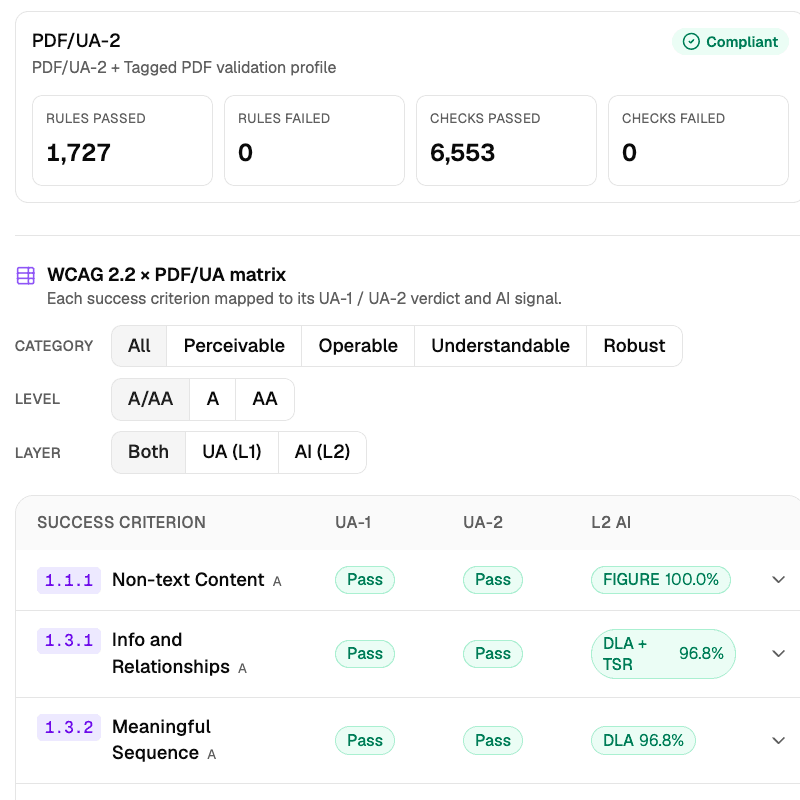
L1 · Machine check
WCAG rules, validated with veraPDF
- Tagged isn't the same as accessible — so what's the bar?
- A public standard, not ours — PDF/UA (ISO 14289), which is how WCAG is built into a PDF.
- Does it pass an independent checker?
- Yes — veraPDF, built by the PDF Association who author the standard.
- Real accessibility is ongoing work. Need a record of yours?
- Yes — full veraPDF results download as a dated file, every run.
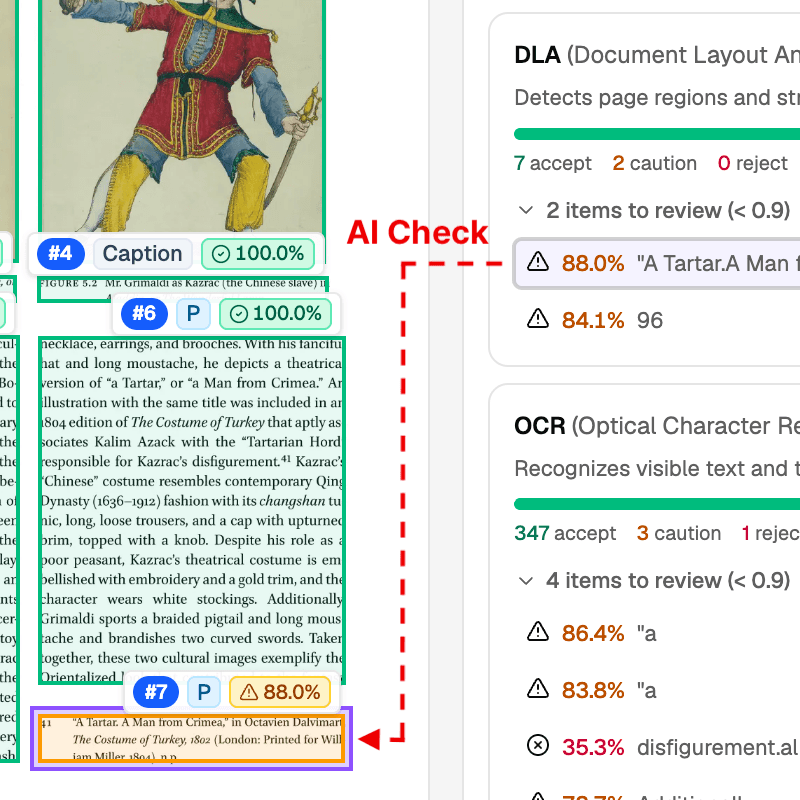
L2 · AI check
AI Assist on what rules can't reach
- Can I fully trust the AI?
- No — a strong first opinion, not the last word. That's what L3 is for.
- Then why use it?
- It sorts what it's sure of from what it isn't, so a person only weighs the rest — days of review become hours.
- Real accessibility is ongoing work. Does the AI leave its trace?
- Yes — every module records how it read the page and how sure it was.
L3 · Human review
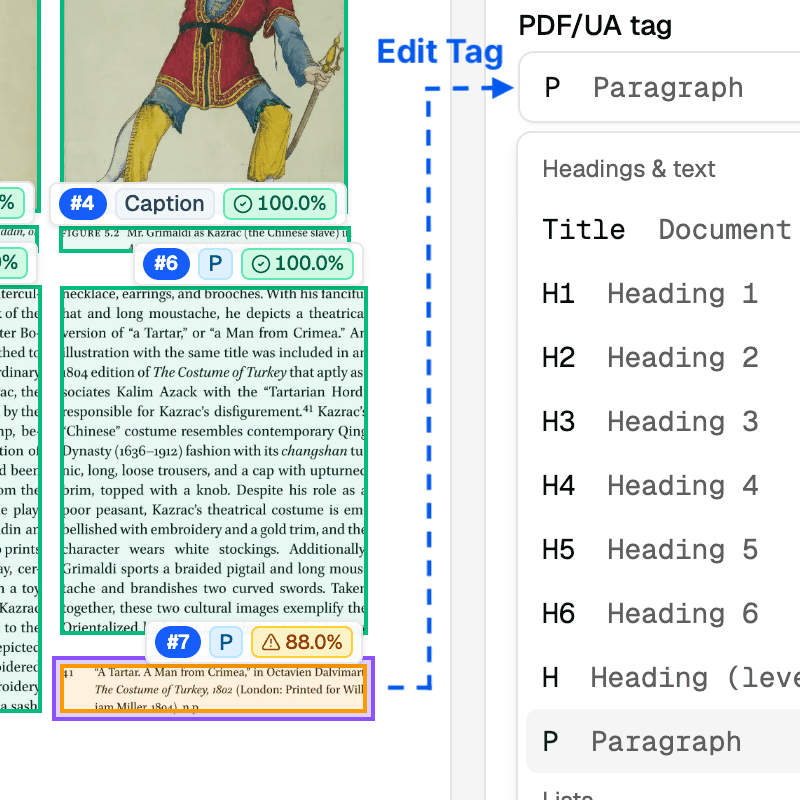
Human review on the meaning AI can't grasp
- Can I see the results meet my standard myself?
- Yes — open the structure, inspect any tag, and read it against the L1 checks and L2 scores.
- If it needs manual correction, can I do it right here?
- Yes — reading order, alt text, tags and table structure are all editable in place.
- Real accessibility is ongoing work. Is the human review on the record?
- Yes — the review and its corrections are kept as a record for each document.
Everyone's right to the document doesn't expire. If keeping it that way is your job, we can help you run it.
Talk to usWhen does the backlog end?
A finish date, measured on a sample of your own PDFs.
Auto-Triage
Most pages take the fast path — automatically
Capacity planner
See the finish date before you buy
Have a backlog and a deadline? Tell us your volume and we'll help you scope it.
Talk to usLooking for PDF/UA conversion?
PDF/UA is how WCAG becomes checkable inside a PDF.
Convert & validate
Five targets, produced and checked in one pass
PDF 1.7
PDF 2.0
- Rule by rule, pass or fail
- Same check, in and out
- Full results, yours to keep
Not sure which one applies to your documents? Tell us what your requirement says and we'll name the target.
Talk to usTag your own documents today.
Talk to us when you need more.
ODL PDF
- Convert to HTML, JSON, Markdown
- Auto-Triage
ODL Auto-Tag
- Machine engineText only, fast
- OSS AIBasic quality, open-source
- ODL AIAdvanced qualityEnterprise
ODL Accessibility Workspace
- RemediateFix tags, alt text and text in place
- VerifyMachine check, AI check, WCAG matrix
- RecordA record per document
ODL PDF/UA
- Convert to PDF/UAPDF/UA-1, PDF/UA-2
- Validate & ReportWCAG
ODL AI
- OCR
- Alt text
- Tables, formulas & charts
ODL HTML
- Convert PDF to accessible HTMLWCAG
- Reflow & fixed layout
- Self-hosted & On-prem
- SSO
- Audit log
- Priority support
We scope it with you — your documents, your volume, and where they have to end up.
What's live — and what's coming in 2026
- Q1 2026
ODL PDF
Converts PDFs to HTML, JSON and Markdown.
2026.03Open source - Q2 2026
ODL Auto-Tag
Tags structure and reading order — rules or open-source AI.
2026.04Open source - Q3 2026
ODL AI
OCR, alt text, tables, formulas and charts.
2026.07EnterpriseODL PDF/UA
Converts to PDF/UA-1, 2 and WTPDF, and validates it.
2026.07Enterprise - Q4 2026
ODL Accessibility Workspace
One place to remediate, verify and record.
PreviewEnterpriseODL HTML
Publishes WCAG HTML — reflowable or fixed-layout.
PreviewEnterprise
Have your own timeline? Talk to us — we'll scope the roadmap with you.
Built on Industry Standards
Based on PDF Association specifications and best practice guides, developed with Hancom and Dual Lab.


Whatever rule you were handed, this is where you start.
WCAG (Web Content Accessibility Guidelines) is the foundation of digital inclusion, and of legal and technical interoperability.
regulations